
Sign-in scorecard
FairPlay Login — Genuine Sign-In Route That Avoids the 12-Minute Hold
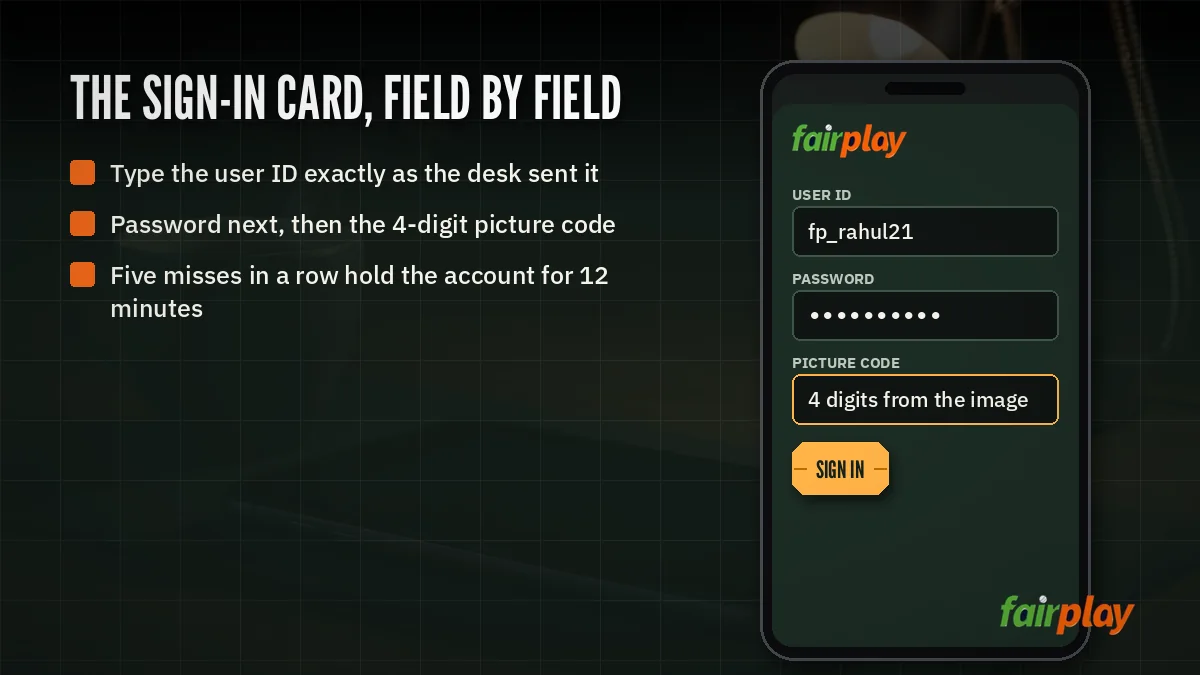
To log in to FairPlay, type your user ID, then your password, then the 4-digit picture code drawn beside the box, and press sign in once. Five wrong submits put the account on a 12-minute hold, so after a second miss stop, check each entry, and only then try again.
FairPlay Login Scorecard — The Clear Three-Entry Order
Three entries, one order. That is the entire FairPlay login, and nearly every complaint we hear about it traces back to one of two habits: filling the boxes out of sequence, or racing through the picture code because the first two felt routine.
Think of it like a scorer's sheet at a club ground. Nobody writes the bowler's figures before the batter's name. The FairPlay sign-in screen works the same way, top to bottom, and it rewards patience more than speed.
- Open the sign-in screen from this page. The buttons here point at the current FairPlay address. A bookmark from last season may not, which is a separate problem covered lower down.
- User ID goes first. Type the ID exactly as it was issued to you. Not your name, not your email, and not a phone number unless the desk actually gave you that as the ID.
- Password second. The one you are using now, not the one from the welcome message if you have since changed it.
- Picture code third. Four digits sit inside a small image next to the box. Read them slowly. Type them.
- Press sign in once. If the screen seems to hang, wait a few seconds rather than tapping again, because a second tap might go through as a second attempt, and FairPlay only gives you five before the hold.
What each FairPlay login entry actually expects
- User ID
- The account name FairPlay attached to you when the ID was created. Copy-pasting it from a chat is fine, but check for a stray space at the end, since some notes apps add one without asking.
- Password
- Whatever you last set. Phones love to capitalise the first letter of anything typed into a fresh box, so glance at that first character before moving on.
- Picture code
- A 4-digit number drawn as an image. It exists to stop bots, which is why it is slightly blurry on purpose. If you genuinely cannot tell a 1 from a 7, do not guess; a guess costs one of your five.
- Sign-in press
- One press, then wait. The board either opens your account or tells you something was wrong. Read that message before you touch anything else.
Copying your FairPlay user ID from a chat without breaking it
Most people get their ID in a message and copy it from there, which is sensible. Long-press, copy, paste into the user ID box. The trouble starts when the copy grabs more than the ID: a full stop from the end of the sentence, a line break, or the space before the next word. The box will happily accept all of it and the board will refuse it.
Two habits help. Paste the ID into a notes app first and look at where the cursor ends up, and if your ID mixes letters and digits, check the ones that look alike, O and 0, l and 1. Typing it once by hand, slowly, is often faster then fixing a bad paste after two misses.
None of this works without an account, obviously. If you are still waiting on an ID, the FairPlay sign-up steps come first, and the page on getting a FairPlay ID explains what you receive at the end of it.
Order matters more than speed here. ID, password, picture code, sign in. Typing the code before the password does not break anything, but it is how people end up submitting a half-filled screen.
A regular from Nagpur told us he lost three tries one evening before an India chase without once getting his password wrong. His phone had been capitalising the first letter of his user ID every time. He found it on the fourth go, and swore at the keyboard, and then logged in fine. Small thing. Cost him most of his margin for error though.
The FairPlay 12-Minute Hold — Real Timing and a Safe Restart
Here is the rule in one line: five wrong attempts and FairPlay holds the account for 12 minutes. That is it. There is no warning counter on most screens, so you have to keep count yourself.
How the FairPlay hold counts your misses
Plan as if every failed submit counts, whichever box was wrong. A typo in the user ID, a stale password and a misread picture code are three different mistakes, but it is safest to assume the board sees them as three strikes against the same five. Is that exactly how the counter is built? Hard to say from the outside. In practice it doesn't matter much, because planning for the stricter version never costs you anything.
The hold sits on the account, or at least you should treat it that way. Switching from the app to a browser in the middle of a hold is not a shortcut. At best it changes nothing; at worst you add more misses while the clock is already running.
A worked FairPlay timeline
Say a match starts at 7:30 PM and you try to sign in at 7:20. This is roughly how a bad run plays out, and how a careful one differs.
| Time | Rushed run | Careful run |
|---|---|---|
| 7:20 PM | Miss 1: picture code guessed | Miss 1: password typo |
| 7:21 PM | Miss 2: same guess again | Stops, checks the caps on the ID and password |
| 7:22 PM | Miss 3 and miss 4, back to back | Signs in on the second submit |
| 7:23 PM | Miss 5: hold starts | Already on the FairPlay board |
| 7:35 PM | Hold ends, roughly five minutes into the match | Watching the first over |
The difference between those two columns is not skill. It is one pause after the second miss. Twelve minutes sounds short until it lands right on top of the toss, and then it feels a lot longer then it is.
Restarting FairPlay login after the hold
- Leave it alone for the full 12 minutes. Trying at minute ten is how people restart the whole thing.
- Before the next try, write the user ID somewhere you can see it and type it from there.
- If the password is the doubtful part, stop guessing and use the FairPlay login password reset route instead.
- Read the picture code out loud, digit by digit. Sounds silly. Works.
One more thing. If you hit the hold twice in an evening, the problem is probably not your typing. It is likely a wrong ID or an old password, and no amount of retrying will fix either of those. The desk can confirm which ID belongs to you; the reset page handles the password.
People also search
FairPlay Login Search Terms — Verified Meanings on This Board
Where fairplay login and fairplay log in land on this page
Both spellings mean the same task: getting into an existing FairPlay account. Whether you type fairplay login as one word or fairplay log in as two, the answer is the scorecard at the top of this page, the three entries in order and the five-miss limit that triggers the 12-minute hold.
What www fairplay in login and fairplay login update point to here
Typing www fairplay in login into a search bar is a guess at a permanent address that FairPlay does not really have. Domains get blocked and swapped, and that swap is what most people searching fairplay login update are running into. Your ID and balance ride along unchanged; only the door moves, and the buttons on this page follow it.
| Search form | Answered on this page by |
|---|---|
| fairplay login | The three-entry sign-in order and the hold rule |
| fairplay log in | Same steps, written for the two-word spelling |
| www fairplay in login | The current sign-in address behind every button here |
| fairplay login number | What to type as the ID, and where the desk contact sits |
| fairplay login update | An address change that keeps your ID and balance |
| fairplay app login | The app and browser comparison further down |
| fairplay login problem | The fault-by-fault fix list below the comparison |
How fairplay app login, login number and login problem are covered below
A fairplay app login asks for exactly the same entries as the browser; the device section below lists where the two behave differently in daily use.
The fairplay login number search splits two ways, the ID itself or the desk contact, and both are handled in the fix list. Any fairplay login problem, from a page that will not load to a picture code you keep missing, has its own row there too.
FairPlay App Login vs Browser — Fast Checks per Device
Same account, same three boxes. The FairPlay app and a mobile or desktop browser ask for identical entries, and the hold rule follows you to to either. What changes is the stuff around the boxes: keyboards, saved passwords, screen size.
On the FairPlay app. Signing in tends to be quicker once the app remembers your ID, and that convenience is also the catch. If you changed your password on another device, the app may still offer the old one, and tapping it without thinking is a free miss. Install details, versions and what the app looks like after sign-in are on the FairPlay app download page, so they are not repeated here.
In a browser. Chrome and Safari both like to autofill. That is helpful right up to the moment it fills a password from some other site with a similar name. On a laptop the picture code is easier to read; on a small phone, zoom in with two fingers before typing the digits rather than squinting at them. Private or incognito tabs won't keep your ID, which is fine on a borrowed phone and annoying on your own.
| Point | FairPlay app | Browser |
|---|---|---|
| Entries asked | User ID, password, picture code | User ID, password, picture code |
| Most common slip | An old saved password offered after a change | Autofill pulling details from another site |
| Picture code reading | Small, zoom if unsure | Easier on a laptop, zoom on phones |
| After five misses | 12-minute hold | 12-minute hold |
| Address changes | Usually handled by updating the app | Use the button on this page |
That last row deserves a hedge. Whether the app picks up a new address on its own depends on the build you have, and we would rather not promise it. If the app stops connecting, try the browser through this page before assuming your FairPlay account has a problem.
Borrowed phones are their own small category. If you sign in to FairPlay on a friend's handset during a match, do it in a private tab so the browser does not save your ID, and sign out before handing it back. It takes five seconds. Leaving an account open on someone else's phone is a much bigger headache than a 12-minute hold ever will be.
Desktop users get one quiet advantage. A bigger screen makes the 4-digit code obvious, and a physical keyboard does not autocorrect anything. If you keep missing on the phone, the laptop is a perfectly good plan B (assuming you know the password, of course).
FairPlay Login Problem and Login Update — Quick Fixes in Order
Most FairPlay login problems fall into four buckets. Work out which one you are in before trying anything, because the fix for one is useless for the other three.
- The page will not open at all
- Almost always the address, not your account. Betting domains get blocked by Indian internet providers from time to time, and an old bookmark simply stops loading. Open sign-in from this page.
- The page opens, the details are refused
- Check the ID first, then the password. Count your misses. At three, stop and check rather than trying a fourth.
- The picture code keeps failing
- You are probably misreading a digit. Zoom in, or reload the screen so a fresh code is drawn, and only type what you are sure of.
- The account says it is held
- Five misses have already happened. Wait the full 12 minutes, no taps, then use the restart steps above.
When the FairPlay sign-in page refuses to load
A blank screen or a browser error is not FairPlay telling you anything about your account. It means the address you used is not reachable from your connection right now. Switching between mobile data and Wi-Fi sometimes helps for a moment, but the reliable fix is to use the current address, which is what every sign-in button on this page leads to. Your details do not change when the address does.
What a FairPlay login update really changes
Very little, from your side. When people talk about a login update they almost always mean that the address moved, and the old one stopped working. The user ID is the same. The password is the same. The balance is the same. You sign in at the new address with exactly the details you used last week.
That is the theory, anyway. In practice a few people get caught because their phone's password manager saved the password against the old address and won't offer it on the new one. Type it by hand once and save it again. Then you are sorted until the next move.
The FairPlay login number question
Two quite different people search for a FairPlay login number. One has an ID with digits in it and wonders if the digits are optional, or if a phone number can stand in. Neither: type every character of the ID the way it was issued. The other person simply wants someone to message when sign-in keeps failing. That desk contact, with its hours, is on the FairPlay customer care number page, which is the right place to ask which ID is actually yours.
When to stop trying and hand it to the FairPlay desk
- You have hit the hold twice and you are sure the password is right.
- You are not certain which user ID belongs to you, maybe because you have had more than one.
- The page loads from this site's buttons but still refuses details you know are correct.
For anything outside those three, the steps on this page should be enough. And if the password is the problem, it is quicker to reset it then to keep guessing, the reset side has its own FairPlay page so we have kept it off this one.
FairPlay Login Questions With Clear, Short Answers
How do I log in to FairPlay?
Fill three boxes from the top down: the user ID FairPlay issued you, your current password, then the four digits drawn in the small picture beside the last box. Press sign in a single time and wait. If the board refuses you twice, pause and recheck before a third go, since the fifth miss means a hold.
Why is my FairPlay login page not opening?
Most often your bookmark points to a FairPlay address that an Indian provider has since blocked, and a blocked betting domain simply stops loading. Your account is untouched. Use a sign-in button on this page, which follows the working address, and type the same ID and password you always use.
Does a wrong picture code count toward the FairPlay five-miss limit?
Plan as if it does. Treat each failed submit as one of the five, whichever box caused it, because the fifth one holds the FairPlay account for 12 minutes. Sit out the whole hold without tapping anything, then come back and read the digits one at a time before you type.
Is FairPlay app login different from browser login?
Not in what it asks for: user ID, password and the 4-digit picture code appear in both, in the same order. What differs is the phone around the boxes, such as an app still offering a password you replaced last week. Downloading and installing is handled separately on the FairPlay app page.
What does a FairPlay login update mean after an address change?
It means the sign-in address moved, not your account. Betting domains get blocked and replaced, but your FairPlay user ID, password and balance carry over. Sign in at the new address with the same details; you do not need a fresh ID or a new password.
Is FairPlay login safe to use?
Yes, as long as you sign in only through the address linked on this page and keep your details private. Never share your password or picture code with anyone, including people claiming to be the FairPlay desk, and log out after using a shared or borrowed phone.
I forgot my FairPlay password, how do I get back in?
Stop guessing, because five misses trigger a 12-minute hold. Go to the FairPlay login password page, which covers the reset route step by step, then sign in with the new password once it is set. Your user ID and balance stay exactly as they were.